PASCAL JOURDAN
Well-Known Member
- Messages
- 120
- Solutions
- 3
- Reaction score
- 2
- Points
- 18
hello
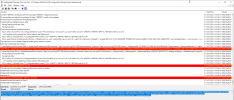
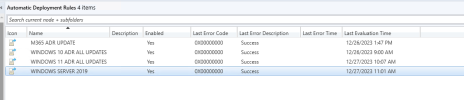
I have set up ADR on my site for windows updates however they do not install whether it is available or requiered it is the same pb
Rule XML is: <AutoDeploymentRule xmlns:xsi="http://www.w3.org/2001/XMLSchema-instance" xmlns:xsd="http://www.w3.org/2001/XMLSchema"> <DeploymentId></DeploymentId> <DeploymentName>WINDOWS SERVER 2019</DeploymentName> <UpdateGroupId>ScopeId_90FC41AC-CCE3-42FB-BDD8-7EFF8B93272A/AuthList_b9604118-5dd7-4d87-9d1a-7afa62010f87</UpdateGroupId> <UpdateGroupName></UpdateGroupName> <LocaleId>1033</LocaleId> <UseSameDeployment>false</UseSameDeployment> <AlignWithSyncSchedule>false</AlignWithSyncSchedule> <NoEULAUpdates>false</NoEULAUpdates> <EnableAfterCreate>true</EnableAfterCreate> <ScopeIDs><ScopeID>SMS00UNA</ScopeID> </ScopeIDs> <EnableFailureAlert>true</EnableFailureAlert> <IsServicingPlan>false</IsServicingPlan> <IsOldUpdateGroupCurrent>true</IsOldUpdateGroupCurrent> </AutoDeploymentRule>
Criteria Filter Result XML is: <AutoDeploymentRule xmlns:xsi="http://www.w3.org/2001/XMLSchema-instance" xmlns:xsd="http://www.w3.org/2001/XMLSchema"> <DeploymentId></DeploymentId> <DeploymentName>WINDOWS SERVER 2019</DeploymentName> <UpdateGroupId>ScopeId_90FC41AC-CCE3-42FB-BDD8-7EFF8B93272A/AuthList_b9604118-5dd7-4d87-9d1a-7afa62010f87</UpdateGroupId> <UpdateGroupName></UpdateGroupName> <LocaleId>1033</LocaleId> <UseSameDeployment>false</UseSameDeployment> <AlignWithSyncSchedule>false</AlignWithSyncSchedule> <NoEULAUpdates>false</NoEULAUpdates> <EnableAfterCreate>true</EnableAfterCreate> <ScopeIDs><ScopeID>SMS00UNA</ScopeID> </ScopeIDs> <EnableFailureAlert>true</EnableFailureAlert> <IsServicingPlan>false</IsServicingPlan> <IsOldUpdateGroupCurrent>true</IsOldUpdateGroupCurrent> </AutoDeploymentRule>
I have set up ADR on my site for windows updates however they do not install whether it is available or requiered it is the same pb
Rule XML is: <AutoDeploymentRule xmlns:xsi="http://www.w3.org/2001/XMLSchema-instance" xmlns:xsd="http://www.w3.org/2001/XMLSchema"> <DeploymentId></DeploymentId> <DeploymentName>WINDOWS SERVER 2019</DeploymentName> <UpdateGroupId>ScopeId_90FC41AC-CCE3-42FB-BDD8-7EFF8B93272A/AuthList_b9604118-5dd7-4d87-9d1a-7afa62010f87</UpdateGroupId> <UpdateGroupName></UpdateGroupName> <LocaleId>1033</LocaleId> <UseSameDeployment>false</UseSameDeployment> <AlignWithSyncSchedule>false</AlignWithSyncSchedule> <NoEULAUpdates>false</NoEULAUpdates> <EnableAfterCreate>true</EnableAfterCreate> <ScopeIDs><ScopeID>SMS00UNA</ScopeID> </ScopeIDs> <EnableFailureAlert>true</EnableFailureAlert> <IsServicingPlan>false</IsServicingPlan> <IsOldUpdateGroupCurrent>true</IsOldUpdateGroupCurrent> </AutoDeploymentRule>
Criteria Filter Result XML is: <AutoDeploymentRule xmlns:xsi="http://www.w3.org/2001/XMLSchema-instance" xmlns:xsd="http://www.w3.org/2001/XMLSchema"> <DeploymentId></DeploymentId> <DeploymentName>WINDOWS SERVER 2019</DeploymentName> <UpdateGroupId>ScopeId_90FC41AC-CCE3-42FB-BDD8-7EFF8B93272A/AuthList_b9604118-5dd7-4d87-9d1a-7afa62010f87</UpdateGroupId> <UpdateGroupName></UpdateGroupName> <LocaleId>1033</LocaleId> <UseSameDeployment>false</UseSameDeployment> <AlignWithSyncSchedule>false</AlignWithSyncSchedule> <NoEULAUpdates>false</NoEULAUpdates> <EnableAfterCreate>true</EnableAfterCreate> <ScopeIDs><ScopeID>SMS00UNA</ScopeID> </ScopeIDs> <EnableFailureAlert>true</EnableFailureAlert> <IsServicingPlan>false</IsServicingPlan> <IsOldUpdateGroupCurrent>true</IsOldUpdateGroupCurrent> </AutoDeploymentRule>