Forums on Intune, SCCM, and Windows 11

Welcome to the forums. Register a free account today to become a member! Once signed in, you'll be able to participate on this site by adding your topics and posts, as well as connect with other members through your own private inbox!

PENDING ADR does not install updates

  • Thread starter Thread starter Cross89
  • Start date Start date
  • Replies Replies 7
  • Views Views 5K

Cross89

Member
Messages
10
Solutions
3
Reaction score
0
Points
1
Greetings.
Created a rule for automatically installing updates for antivirus and updates for the Windows 10 operating system
The rule was created and ran without errors, with each synchronization a new Software Update Group appears
But in monitoring section - deployment
shows all devices in the "unknown" status and no one receives updates, no errors, no attempts.
Just standing still
ADR

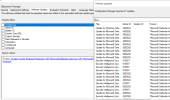
111111111и.PNG

ADR rules
2222222222222.PNG

Software Group
333.PNG

Monitor Deployments
1675430645252.png
1675430714536.png

If you deploy applications to the same group, then everything goes without errors
 
Solution
I looked at various magazines for a long time and found an error that, when decrypted, clearly indicated problems with the firewall. since the antivirus was not enabled on the test server and all the rules were added, I contacted the security department, who confirmed that the error was on their part in setting up network protection, after they fixed the error, everything started up and the statistics went so the thread can be closed
Greetings.

But in monitoring section - deployment
shows all devices in the "unknown" status and no one receives updates, no errors, no
Unknown status is an error. It means that devices have not scanned for the SU, which is a problem. You need to figure that out first.
 
I do not quite understand

what do you mean by "scanned"
Each computer scans itself to see what Software Update apply to the computer. This info is returned to WSUS/ConfigMgr. If the computer is unknown in ConfigMgr then it means it is not healthy and you need to fix it.
 
I took for analysis a couple of PCs with an unknown status
and opened their PolicyAgent.log
Requesting User policy assignments for 'S-1-5-21-2518802548-2247100493-1082812624-6625' from authority 'SMS:NHS'. IsDomainUser = 1, IsCloudUser = 1 PolicyAgent_RequestAssignments 2/7/2023 11:28:57 AM 26028 (0x65AC)
Raising event:
instance of CCM_PolicyAgent_AssignmentsRequested
{
AuthorityName = "SMS:NHS";
ClientID = "GUID:F983B240-236C-4BD8-93E7-45AD3438B8C2";
DateTime = "20230207092857.816000+000";
ProcessID = 11548;
ResourceName = "S-1-5-21-2518802548-2247100493-1082812624-6625";
ResourceType = "User";
ThreadID = 26028;
};
PolicyAgent_RequestAssignments 2/7/2023 11:28:57 AM 26028 (0x65AC)
Processing User assignments from 'SMS:NHS'. The new cookie is ''. PolicyAgent_RequestAssignments 2/7/2023 11:28:57 AM 26028 (0x65AC)
Raising event:
instance of CCM_PolicyAgent_AssignmentsReceived
{
AuthorityName = "SMS:NHS";
ClientID = "GUID:F983B240-236C-4BD8-93E7-45AD3438B8C2";
DateTime = "20230207092857.816000+000";
ProcessID = 11548;
ReplyType = "Delta";
ResourceName = "S-1-5-21-2518802548-2247100493-1082812624-6625";
ResourceType = "User";
ThreadID = 26028;
};
PolicyAgent_RequestAssignments 2/7/2023 11:28:57 AM 26028 (0x65AC)
Received User delta policy update with 0 assignments PolicyAgent_RequestAssignments 2/7/2023 11:28:57 AM 26028 (0x65AC)
User 'S-1-5-21-2518802548-2247100493-1082812624-6625' is member of 6 Domain Security Groups PolicyAgent_RequestAssignments 2/7/2023 11:28:57 AM 26028 (0x65AC)

WUAHandler.log -

CWuaHandler::SetCategoriesForStateReportingExclusion called with E0789628-CE08-4437-BE74-2495B842F43B;E0789628-CE08-4437-BE74-2495B842F43B,A38C835C-2950-4E87-86CC-6911A52C34A3; for leaves and E0789628-CE08-4437-BE74-2495B842F43B,A38C835C-2950-4E87-86CC-6911A52C34A3; for bundles

Previously, there were errors in this log, but for a couple of days everything is clean ...

After that I reviewed the CcmMessaging.log
Access check failed against user 'User' CcmMessaging 2/7/2023 9:38:58 AM 29628 (0x73BC)
Could not open registry key for user S-1-5-21-2518802548-2247100493-1082812624-2612, 0x80070002 CcmMessaging 2/7/2023 9:38:58 AM 20712 (0x50E8)
GetuserTokenFromSid, couldn't find logon session for user sid S-1-5-21-2518802548-2247100493-1082812624-2612 CcmMessaging 2/7/2023 9:38:58 AM 20712 (0x50E8)
Post to http://sccm-contoso.loc/ccm_system/request failed with 0x87d00323. CcmMessaging 2/7/2023 9:38:58 AM 20712 (0x50E8)
Could not open registry key for user S-1-5-21-2518802548-2247100493-1082812624-2734, 0x80070002 CcmMessaging 2/7/2023 9:38:59 AM 20712 (0x50E8)
GetuserTokenFromSid, couldn't find logon session for user sid S-1-5-21-2518802548-2247100493-1082812624-2734 CcmMessaging 2/7/2023 9:38:59 AM 20712 (0x50E8)
Post to http://sccm-contoso.loc/ccm_system/request failed with 0x87d00323. CcmMessaging 2/7/2023 9:38:59 AM 20712 (0x50E8)
Could not open registry key for user S-1-5-21-2518802548-2247100493-1082812624-3655, 0x80070002 CcmMessaging 2/7/2023 9:38:59 AM 20712 (0x50E8)
GetuserTokenFromSid, couldn't find logon session for user sid S-1-5-21-2518802548-2247100493-1082812624-3655 CcmMessaging 2/7/2023 9:38:59 AM 20712 (0x50E8)
Post to http://sccm-contoso.loc/ccm_system/request failed with 0x87d00323. CcmMessaging 2/7/2023 9:38:59 AM 20712 (0x50E8)
Access check failed against user 'Severyna.Stasyshyn' CcmMessaging 2/7/2023 10:08:57 AM 22660 (0x5884)
Access check failed against user 'Severyna.Stasyshyn' CcmMessaging 2/7/2023 11:28:57 AM 26028 (0x65AC)


Each computer scans itself to see what Software Update apply to the computer. This info is returned to WSUS/ConfigMgr. If the computer is unknown in ConfigMgr then it means it is not healthy and you need to fix it.
 
Last edited:
I worked on some errors in the ScanAgent and WUAHandler logs

An error was found and fixed in border groups (distribution point not specified)
Account password for client installation
Synchronization settings
Conflict with group policy (disabled the item specifying the update server)

But I can't figure out the error

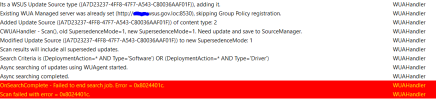
WUAHandler
OnSearchComplete - Failed to end search job. Error = 0x80240440. WUAHandler 2/13/2023 3:38:46 PM 2672 (0x0A70)
Scan failed with error = 0x80240440. WUAHandler 2/13/2023 3:38:46 PM 2672 (0x0A70)

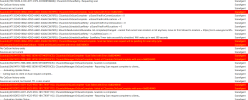
ScanAgent
Sources are current, but Invalid. TTL is also invalid. ScanAgent 2/13/2023 3:38:29 PM 16080 (0x3ED0)
ScanJob({431BDFD3-E0F1-4525-9FC6-1B1C793FF11C}): CScanJob::OnScanComplete -Scan Failed with Error=0x80240440 ScanAgent 2/13/2023 3:38:29 PM 2672 (0x0A70)


Can someone help with this error?

1.PNG
2.PNG
 
I worked on some errors in the ScanAgent and WUAHandler logs

An error was found and fixed in border groups (distribution point not specified)
Account password for client installation
Synchronization settings
Conflict with group policy (disabled the item specifying the update server)

But I can't figure out the error

WUAHandler
OnSearchComplete - Failed to end search job. Error = 0x80240440. WUAHandler 2/13/2023 3:38:46 PM 2672 (0x0A70)
Scan failed with error = 0x80240440. WUAHandler 2/13/2023 3:38:46 PM 2672 (0x0A70)

ScanAgent
Sources are current, but Invalid. TTL is also invalid. ScanAgent 2/13/2023 3:38:29 PM 16080 (0x3ED0)
ScanJob({431BDFD3-E0F1-4525-9FC6-1B1C793FF11C}): CScanJob::OnScanComplete -Scan Failed with Error=0x80240440 ScanAgent 2/13/2023 3:38:29 PM 2672 (0x0A70)


Can someone help with this error?

View attachment 5045
View attachment 5046
I worked on some errors in the ScanAgent and WUAHandler logs

An error was found and fixed in border groups (distribution point not specified)
Account password for client installation
Synchronization settings
Conflict with group policy (disabled the item specifying the update server)

But I can't figure out the error

WUAHandler
OnSearchComplete - Failed to end search job. Error = 0x80240440. WUAHandler 2/13/2023 3:38:46 PM 2672 (0x0A70)
Scan failed with error = 0x80240440. WUAHandler 2/13/2023 3:38:46 PM 2672 (0x0A70)

ScanAgent
Sources are current, but Invalid. TTL is also invalid. ScanAgent 2/13/2023 3:38:29 PM 16080 (0x3ED0)
ScanJob({431BDFD3-E0F1-4525-9FC6-1B1C793FF11C}): CScanJob::OnScanComplete -Scan Failed with Error=0x80240440 ScanAgent 2/13/2023 3:38:29 PM 2672 (0x0A70)


Can someone help with this error?

View attachment 5045
View attachment 5046
Got the same issue ran the windows update reset tool on one of the client machines and it started scanning
 
I looked at various magazines for a long time and found an error that, when decrypted, clearly indicated problems with the firewall. since the antivirus was not enabled on the test server and all the rules were added, I contacted the security department, who confirmed that the error was on their part in setting up network protection, after they fixed the error, everything started up and the statistics went so the thread can be closed
 
Solution

Forum statistics

Threads
7,144
Messages
27,894
Members
18,190
Latest member
escdarck

Trending content

Back
Top