Forums on Intune, SCCM, and Windows 11

Welcome to the forums. Register a free account today to become a member! Once signed in, you'll be able to participate on this site by adding your topics and posts, as well as connect with other members through your own private inbox!

SOLVED Added secondary SUP But client "Local Policy" still points to original site server

Status
Not open for further replies.

Paresh

Member
Messages
6
Reaction score
0
Points
1
Hi

Please may someone assist... Newly installed SUP

We have SCCM 2010. We have different branches ( different Subnets). I have my boundary group setup to use its own subnet. All clients currently are getting SUP from the original branch. I added the SUP role to a server on a specific subnet. Ran "RSOP.MSC" but those clients are still pointing to the old SUP server? How does the new clients point to the new server? Hope I explained is properly.

Thanks in advance.
Paresh
 
Hi @Paresh,

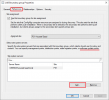
You have to add the new SUP as a site system server in the properties of the related Boundary Groups.

1615041187556.png

Once your clients will receive the new policy, check the LocationServices.log under "%WINDIR%\CCM\Logs"
 
Hi @Paresh,

You have to add the new SUP as a site system server in the properties of the related Boundary Groups.

View attachment 3438

Once your clients will receive the new policy, check the LocationServices.log under "%WINDIR%\CCM\Logs"
Hi

Thank you for your response. Yes I did add the SUP to the "Boundary Group" created. Checked the log and it shows the old server. Pushed the policy from the SCCM server to that collection again. I even locally ran the "Configuration manager run tasks from crtl panel.
 
Do you have any GPO that force the WSUS server on these devices?
I did but remove them . I have seen that SCCM sets the local policy pointing to the SCCM server.

This is what i see in the logs. It shows both my SUP's BUT pushes out the first SUP.

1615046189947.png
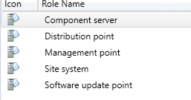
Does the second server need any other role beside the "SUP" role? I just added the management point as well just to test it that an issue. Below are the role on the other subnet. Bear in ind this is one site with multiple subnets/locations.

1615046251394.png

Thanks
 
Under Device view, add the Boundary Group column and make sure that only one is configured.

1615046950279.png
 
Solution
Under Device view, add the Boundary Group column and make sure that only one is configured.

View attachment 3441
OK, So I see 2. How do I remove one?
I also noticed this network that encompasses the second SUP subnet. I assume that an issue? I should only have subnets defined that are actually within the "boundary group". Excuse my knowledge I inherited this and still a newbie...
 
Right, but it depends of the configuration of your existing boundary groups, make sure that the main boundary group has not the subnet of the new site as a boundaries.

What kind of boundaries do you have? (AD site, subnet, IP Address range etc).
 
Right, but it depends of the configuration of your existing boundary groups, make sure that the main boundary group has not the subnet of the new site as a boundaries.

What kind of boundaries do you have? (AD site, subnet, IP Address range etc).
Hi Youssef
Ok, So I checked and removed that subnet which worked. Just a question... With some laptops going to different offices & working in different subnets... How would that work? Will the boundary group show both?
 
It depends of the IP address of the client and the boundary group configuration.
If your boundary groups have unique IP address range/subnet, in this case, the client will be only in one Boundary Group.
 
Status
Not open for further replies.

Forum statistics

Threads
7,133
Messages
27,858
Members
18,151
Latest member
TonyGTR
Back
Top