Forums on Intune, SCCM, and Windows 11

Welcome to the forums. Register a free account today to become a member! Once signed in, you'll be able to participate on this site by adding your topics and posts, as well as connect with other members through your own private inbox!

SOLVED 0x87D00324 application was not detected after the installation

  • Thread starter Thread starter Ammar Fazil
  • Start date Start date
  • Replies Replies 16
  • Views Views 34K
Status
Not open for further replies.

Ammar Fazil

New Member
Messages
4
Reaction score
0
Points
1
Hi,

I am new to SCCM, I need your help in fixing the error that is encountered while deploying an application. The error message is 'The application was not detected after the installation completed'. Error code 0x87D00324 (2016410844).

Please help

Thanks
 
Last edited:
Solution
Having the same issue with installing Symantec. We had a big crash on SCCM, took MS engineers several weeks to help stand the system back up, and had to move main distribution point to another location since the original is corrupted.

Since the crash, when deploying SEP, the original detection method will determine it's not installed, then install the application, and on post detection is when it fails, in Software Center with the error code;

0x87D00324 (-2016410844), The Application was not detected after installation completed.

So it first detects the version is not installed, then it installs the new app, and then fails for post detection of what it just installed. This happens to at least 50% of the endpoint in the collection...
Hi Prajwal,

Please find the appenforce.log file details below
+++ Starting Install enforcement for App DT "Microsoft_Ue-VOnOneDrive_Win10_RS1_User" ApplicationDeliveryType - ScopeId_7876E7FC-78A0-414B-A838-78463D90AC6A/DeploymentType_00e87faa-0ca0-418a-b971-07e929af0e62, Revision - 26, ContentPath - C:\WINDOWS\CCMCACHE\72, Execution Context - User

Performing detection of app deployment type Microsoft_Ue-VOnOneDrive_Win10_RS1_User(ScopeId_7876E7FC-78A0-414B-A838-78463D90AC6A/DeploymentType_00e87faa-0ca0-418a-b971-07e929af0e62, revision 26) for user.

+++ Application not discovered with script detection. [AppDT Id: ScopeId_7876E7FC-78A0-414B-A838-78463D90AC6A/DeploymentType_00e87faa-0ca0-418a-b971-07e929af0e62, Revision: 26]

App enforcement environment:
Context: User
Command line: Powershell.exe -noprofile -ExecutionPolicy Unrestricted -File .\Enable_UEV.ps1
Allow user interaction: Yes
UI mode: 2
User token: not null
Session Id: 4294967295
Content path: C:\WINDOWS\CCMCACHE\72
Working directory:

Prepared working directory: C:\WINDOWS\CCMCACHE\72
Found executable file Powershell.exe with complete path C:\WINDOWS\System32\WindowsPowerShell\v1.0\Powershell.exe
Prepared command line: "C:\WINDOWS\System32\WindowsPowerShell\v1.0\powershell.exe" -noprofile -ExecutionPolicy Unrestricted -File .\Enable_UEV.ps1
Executing Command line: "C:\WINDOWS\System32\WindowsPowerShell\v1.0\powershell.exe" -noprofile -ExecutionPolicy Unrestricted -File .\Enable_UEV.ps1 with user context
Working directory C:\WINDOWS\CCMCACHE\72
Post install behavior is NoAction
Waiting for process 2668 to finish. Timeout = 120 minutes.
Process 2668 terminated with exitcode: 0
Looking for exit code 0 in exit codes table..
No action needed after successful enforcement
Performing detection of app deployment type Microsoft_Ue-VOnOneDrive_Win10_RS1_User(ScopeId_7876E7FC-78A0-414B-A838-78463D90AC6A/DeploymentType_00e87faa-0ca0-418a-b971-07e929af0e62, revision 26) for user.

+++ Application not discovered with script detection. [AppDT Id: ScopeId_7876E7FC-78A0-414B-A838-78463D90AC6A/DeploymentType_00e87faa-0ca0-418a-b971-07e929af0e62, Revision: 26]

++++++ App enforcement completed (5 seconds) for App DT "Microsoft_Ue-VOnOneDrive_Win10_RS1_User" [ScopeId_7876E7FC-78A0-414B-A838-78463D90AC6A/DeploymentType_00e87faa-0ca0-418a-b971-07e929af0e62], Revision: 26, User SID: S-1-5-21-74642-3284969411-2123768488-1587737] ++++++

Kindly note that it has failed with the message '0x87D00324 application was not detected after the installation' only in some 500 machines out of
 
Hi Prajwal

I have facing same issue after diployement of commvault agent it's showing the same error we have tested on 4 machines i have diployed VBS script.
 
What is your detection method? What does you VBS look like? What is difference between the computer that are successful and those that are not? How much time has laps?
 
Hi guys,
I am having the same issue for an application deployment that was working before, not sure why it would have changed.

appenforce log below:

App enforcement environment:
Context: Machine
Command line: .\Img\Setup.exe /W /q /I Img\ACad_VT.ini
Allow user interaction: No
UI mode: 1
User token: null
Session Id: 1
Content path: C:\WINDOWS\ccmcache\1q
Working directory: AppEnforce 18/12/2019 08:00:40 5928 (0x1728)
Prepared working directory: C:\WINDOWS\ccmcache\1q AppEnforce 18/12/2019 08:00:40 5928 (0x1728)
Prepared command line: "C:\WINDOWS\ccmcache\1q\.\Img\Setup.exe" /W /q /I Img\ACad_VT.ini AppEnforce 18/12/2019 08:00:40 5928 (0x1728)
Executing Command line: "C:\WINDOWS\ccmcache\1q\.\Img\Setup.exe" /W /q /I Img\ACad_VT.ini with user context AppEnforce 18/12/2019 08:00:40 5928 (0x1728)
Working directory C:\WINDOWS\ccmcache\1q AppEnforce 18/12/2019 08:00:40 5928 (0x1728)
Post install behavior is BasedOnExitCode AppEnforce 18/12/2019 08:00:40 5928 (0x1728)
Waiting for process 14060 to finish. Timeout = 120 minutes. AppEnforce 18/12/2019 08:00:40 5928 (0x1728)
Process 14060 terminated with exitcode: 0 AppEnforce 18/12/2019 08:01:04 5928 (0x1728)
Looking for exit code 0 in exit codes table... AppEnforce 18/12/2019 08:01:04 5928 (0x1728)
Matched exit code 0 to a Success entry in exit codes table. AppEnforce 18/12/2019 08:01:04 5928 (0x1728)
Performing detection of app deployment type Autodesk Vehicle Tracking 2018 (64 bit) Core - Windows Installer (*.msi file)(ScopeId_122865E4-CA5D-484F-9D22-268588B19C14/DeploymentType_494b58dd-e56f-4bd7-a8bc-69d5b2d7a96f, revision 2) for system. AppEnforce 18/12/2019 08:01:04 5928 (0x1728)
+++ MSI application not discovered [MSI Product Code: {9BB641F3-24B1-427E-A850-1C02157219EC}, MSI Product version: ] AppEnforce 18/12/2019 08:01:04 5928 (0x1728)
++++++ App enforcement completed (24 seconds) for App DT "Autodesk Vehicle Tracking 2018 (64 bit) Core - Windows Installer (*.msi file)" [ScopeId_122865E4-CA5D-484F-9D22-268588B19C14/DeploymentType_494b58dd-e56f-4bd7-a8bc-69d5b2d7a96f], Revision: 2, User SID: ] ++++++ AppEnforce 18/12/2019 08:01:04 5928 (0x1728)
 
Hi guys,
I am having the same issue for an application deployment that was working before, not sure why it would have changed.

appenforce log below:

App enforcement environment:
Context: Machine
Command line: .\Img\Setup.exe /W /q /I Img\ACad_VT.ini
Allow user interaction: No
UI mode: 1
User token: null
Session Id: 1
Content path: C:\WINDOWS\ccmcache\1q
Working directory: AppEnforce 18/12/2019 08:00:40 5928 (0x1728)
Prepared working directory: C:\WINDOWS\ccmcache\1q AppEnforce 18/12/2019 08:00:40 5928 (0x1728)
Prepared command line: "C:\WINDOWS\ccmcache\1q\.\Img\Setup.exe" /W /q /I Img\ACad_VT.ini AppEnforce 18/12/2019 08:00:40 5928 (0x1728)
Executing Command line: "C:\WINDOWS\ccmcache\1q\.\Img\Setup.exe" /W /q /I Img\ACad_VT.ini with user context AppEnforce 18/12/2019 08:00:40 5928 (0x1728)
Working directory C:\WINDOWS\ccmcache\1q AppEnforce 18/12/2019 08:00:40 5928 (0x1728)
Post install behavior is BasedOnExitCode AppEnforce 18/12/2019 08:00:40 5928 (0x1728)
Waiting for process 14060 to finish. Timeout = 120 minutes. AppEnforce 18/12/2019 08:00:40 5928 (0x1728)
Process 14060 terminated with exitcode: 0 AppEnforce 18/12/2019 08:01:04 5928 (0x1728)
Looking for exit code 0 in exit codes table... AppEnforce 18/12/2019 08:01:04 5928 (0x1728)
Matched exit code 0 to a Success entry in exit codes table. AppEnforce 18/12/2019 08:01:04 5928 (0x1728)
Performing detection of app deployment type Autodesk Vehicle Tracking 2018 (64 bit) Core - Windows Installer (*.msi file)(ScopeId_122865E4-CA5D-484F-9D22-268588B19C14/DeploymentType_494b58dd-e56f-4bd7-a8bc-69d5b2d7a96f, revision 2) for system. AppEnforce 18/12/2019 08:01:04 5928 (0x1728)
+++ MSI application not discovered [MSI Product Code: {9BB641F3-24B1-427E-A850-1C02157219EC}, MSI Product version: ] AppEnforce 18/12/2019 08:01:04 5928 (0x1728)
++++++ App enforcement completed (24 seconds) for App DT "Autodesk Vehicle Tracking 2018 (64 bit) Core - Windows Installer (*.msi file)" [ScopeId_122865E4-CA5D-484F-9D22-268588B19C14/DeploymentType_494b58dd-e56f-4bd7-a8bc-69d5b2d7a96f], Revision: 2, User SID: ] ++++++ AppEnforce 18/12/2019 08:01:04 5928 (0x1728)

Resolved, found issue with application dependency. this was a bolt-on to a main application that had not been installed. As soon as the main app was installed the bolt-on app worked.
 
++++++ App enforcement completed (4 seconds) for App DT "Infogix_Data3Sixty_Analyze_3.6.8.6779" [ScopeId_AEFA7D60-1E1F-431D-B991-2A5E8E98804A/DeploymentType_46259f4a-bb9b-4c46-8b9d-08b7434a1e75], Revision: 16, User SID: ] ++++++ AppEnforce 5/17/2021 3:56:43 PM 2764 (0x0ACC)
+++ Starting Install enforcement for App DT "Infogix_Data3Sixty_Analyze_3.6.8.6779" ApplicationDeliveryType - ScopeId_AEFA7D60-1E1F-431D-B991-2A5E8E98804A/DeploymentType_46259f4a-bb9b-4c46-8b9d-08b7434a1e75, Revision - 16, ContentPath - C:\WINDOWS\ccmcache\1r, Execution Context - System AppEnforce 5/17/2021 4:19:19 PM 23000 (0x59D8)
Performing detection of app deployment type Infogix_Data3Sixty_Analyze_3.6.8.6779(ScopeId_AEFA7D60-1E1F-431D-B991-2A5E8E98804A/DeploymentType_46259f4a-bb9b-4c46-8b9d-08b7434a1e75, revision 16) for system. AppEnforce 5/17/2021 4:19:19 PM 23000 (0x59D8)
+++ Application not discovered. [AppDT Id: ScopeId_AEFA7D60-1E1F-431D-B991-2A5E8E98804A/DeploymentType_46259f4a-bb9b-4c46-8b9d-08b7434a1e75, Revision: 16] AppEnforce 5/17/2021 4:19:19 PM 23000 (0x59D8)
App enforcement environment:
Context: Machine
Command line: "Package\Install.EXE"
Allow user interaction: No
UI mode: 1
User token: null
Session Id: 2
Content path: C:\WINDOWS\ccmcache\1r
Working directory: AppEnforce 5/17/2021 4:19:19 PM 23000 (0x59D8)
Prepared working directory: C:\WINDOWS\ccmcache\1r AppEnforce 5/17/2021 4:19:19 PM 23000 (0x59D8)
Prepared command line: "C:\WINDOWS\ccmcache\1r\Package\Install.EXE" AppEnforce 5/17/2021 4:19:19 PM 23000 (0x59D8)
Executing Command line: "C:\WINDOWS\ccmcache\1r\Package\Install.EXE" with user context AppEnforce 5/17/2021 4:19:19 PM 23000 (0x59D8)
Working directory C:\WINDOWS\ccmcache\1r AppEnforce 5/17/2021 4:19:19 PM 23000 (0x59D8)
CreateProcessAsUser is called with system account. Check if system temp re-direction is needed. AppEnforce 5/17/2021 4:19:19 PM 23000 (0x59D8)
Post install behavior is BasedOnExitCode AppEnforce 5/17/2021 4:19:19 PM 23000 (0x59D8)
Raising ETW event 20001 AppEnforce 5/17/2021 4:19:19 PM 23000 (0x59D8)
Raised ETW event 20001 AppEnforce 5/17/2021 4:19:19 PM 23000 (0x59D8)
Waiting for process 1816 to finish. Timeout = 120 minutes. AppEnforce 5/17/2021 4:19:19 PM 23000 (0x59D8)
Process 1816 terminated with exitcode: 3221225477 AppEnforce 5/17/2021 4:19:24 PM 23000 (0x59D8)
Looking for exit code -1073741819 in exit codes table... AppEnforce 5/17/2021 4:19:24 PM 23000 (0x59D8)
Unmatched exit code (3221225477) is considered an execution failure. AppEnforce 5/17/2021 4:19:24 PM 23000 (0x59D8)
++++++ App enforcement completed (5 seconds) for App DT "Infogix_Data3Sixty_Analyze_3.6.8.6779" [ScopeId_AEFA7D60-1E1F-431D-B991-2A5E8E98804A/DeploymentType_46259f4a-bb9b-4c46-8b9d-08b7434a1e75], Revision: 16, User SID: ] ++++++ AppEnforce 5/17/2021 4:19:24 PM 23000 (0x59D8)
+++ Starting Install enforcement for App DT "Infogix_Data3Sixty_Analyze_3.6.8.6779" ApplicationDeliveryType - ScopeId_AEFA7D60-1E1F-431D-B991-2A5E8E98804A/DeploymentType_46259f4a-bb9b-4c46-8b9d-08b7434a1e75, Revision - 16, ContentPath - C:\WINDOWS\ccmcache\1r, Execution Context - System AppEnforce 5/17/2021 4:19:30 PM 23000 (0x59D8)
Performing detection of app deployment type Infogix_Data3Sixty_Analyze_3.6.8.6779(ScopeId_AEFA7D60-1E1F-431D-B991-2A5E8E98804A/DeploymentType_46259f4a-bb9b-4c46-8b9d-08b7434a1e75, revision 16) for system. AppEnforce 5/17/2021 4:19:30 PM 23000 (0x59D8)
+++ Application not discovered. [AppDT Id: ScopeId_AEFA7D60-1E1F-431D-B991-2A5E8E98804A/DeploymentType_46259f4a-bb9b-4c46-8b9d-08b7434a1e75, Revision: 16] AppEnforce 5/17/2021 4:19:30 PM 23000 (0x59D8)
App enforcement environment:
Context: Machine
Command line: "Package\Install.EXE"
Allow user interaction: No
UI mode: 1
User token: null
Session Id: 2
Content path: C:\WINDOWS\ccmcache\1r
Working directory: AppEnforce 5/17/2021 4:19:30 PM 23000 (0x59D8)
Prepared working directory: C:\WINDOWS\ccmcache\1r AppEnforce 5/17/2021 4:19:30 PM 23000 (0x59D8)
Prepared command line: "C:\WINDOWS\ccmcache\1r\Package\Install.EXE" AppEnforce 5/17/2021 4:19:30 PM 23000 (0x59D8)
Executing Command line: "C:\WINDOWS\ccmcache\1r\Package\Install.EXE" with user context AppEnforce 5/17/2021 4:19:30 PM 23000 (0x59D8)
Working directory C:\WINDOWS\ccmcache\1r AppEnforce 5/17/2021 4:19:30 PM 23000 (0x59D8)
CreateProcessAsUser is called with system account. Check if system temp re-direction is needed. AppEnforce 5/17/2021 4:19:30 PM 23000 (0x59D8)
Post install behavior is BasedOnExitCode AppEnforce 5/17/2021 4:19:30 PM 23000 (0x59D8)
Raising ETW event 20001 AppEnforce 5/17/2021 4:19:30 PM 23000 (0x59D8)
Raised ETW event 20001 AppEnforce 5/17/2021 4:19:30 PM 23000 (0x59D8)
Waiting for process 25020 to finish. Timeout = 120 minutes. AppEnforce 5/17/2021 4:19:30 PM 23000 (0x59D8)
Process 25020 terminated with exitcode: 3221225477 AppEnforce 5/17/2021 4:19:35 PM 23000 (0x59D8)
Looking for exit code -1073741819 in exit codes table... AppEnforce 5/17/2021 4:19:35 PM 23000 (0x59D8)
Unmatched exit code (3221225477) is considered an execution failure. AppEnforce 5/17/2021 4:19:35 PM 23000 (0x59D8)
++++++ App enforcement completed (5 seconds) for App DT "Infogix_Data3Sixty_Analyze_3.6.8.6779" [ScopeId_AEFA7D60-1E1F-431D-B991-2A5E8E98804A/DeploymentType_46259f4a-bb9b-4c46-8b9d-08b7434a1e75], Revision: 16, User SID: ] ++++++ AppEnforce 5/17/2021 4:19:35 PM 23000 (0x59D8)
+++ Starting Install enforcement for App DT "Infogix_Data3Sixty_Analyze_3.6.8.6779" ApplicationDeliveryType - ScopeId_AEFA7D60-1E1F-431D-B991-2A5E8E98804A/DeploymentType_46259f4a-bb9b-4c46-8b9d-08b7434a1e75, Revision - 16, ContentPath - C:\WINDOWS\ccmcache\1r, Execution Context - System AppEnforce 5/17/2021 4:31:23 PM 21324 (0x534C)
Performing detection of app deployment type Infogix_Data3Sixty_Analyze_3.6.8.6779(ScopeId_AEFA7D60-1E1F-431D-B991-2A5E8E98804A/DeploymentType_46259f4a-bb9b-4c46-8b9d-08b7434a1e75, revision 16) for system. AppEnforce 5/17/2021 4:31:23 PM 21324 (0x534C)
+++ Application not discovered. [AppDT Id: ScopeId_AEFA7D60-1E1F-431D-B991-2A5E8E98804A/DeploymentType_46259f4a-bb9b-4c46-8b9d-08b7434a1e75, Revision: 16] AppEnforce 5/17/2021 4:31:23 PM 21324 (0x534C)
App enforcement environment:
Context: Machine
Command line: "Package\Install.EXE"
Allow user interaction: No
UI mode: 1
User token: null
Session Id: 2
Content path: C:\WINDOWS\ccmcache\1r
Working directory: AppEnforce 5/17/2021 4:31:23 PM 21324 (0x534C)
Prepared working directory: C:\WINDOWS\ccmcache\1r AppEnforce 5/17/2021 4:31:23 PM 21324 (0x534C)
Prepared command line: "C:\WINDOWS\ccmcache\1r\Package\Install.EXE" AppEnforce 5/17/2021 4:31:23 PM 21324 (0x534C)
Executing Command line: "C:\WINDOWS\ccmcache\1r\Package\Install.EXE" with user context AppEnforce 5/17/2021 4:31:23 PM 21324 (0x534C)
Working directory C:\WINDOWS\ccmcache\1r AppEnforce 5/17/2021 4:31:23 PM 21324 (0x534C)
CreateProcessAsUser is called with system account. Check if system temp re-direction is needed. AppEnforce 5/17/2021 4:31:23 PM 21324 (0x534C)
Post install behavior is BasedOnExitCode AppEnforce 5/17/2021 4:31:23 PM 21324 (0x534C)
Raising ETW event 20001 AppEnforce 5/17/2021 4:31:23 PM 21324 (0x534C)
Raised ETW event 20001 AppEnforce 5/17/2021 4:31:23 PM 21324 (0x534C)
Waiting for process 3284 to finish. Timeout = 120 minutes. AppEnforce 5/17/2021 4:31:23 PM 21324 (0x534C)
Process 3284 terminated with exitcode: 3221225477 AppEnforce 5/17/2021 4:31:28 PM 21324 (0x534C)
Looking for exit code -1073741819 in exit codes table... AppEnforce 5/17/2021 4:31:28 PM 21324 (0x534C)
Unmatched exit code (3221225477) is considered an execution failure. AppEnforce 5/17/2021 4:31:28 PM 21324 (0x534C)
++++++ App enforcement completed (5 seconds) for App DT "Infogix_Data3Sixty_Analyze_3.6.8.6779" [ScopeId_AEFA7D60-1E1F-431D-B991-2A5E8E98804A/DeploymentType_46259f4a-bb9b-4c46-8b9d-08b7434a1e75], Revision: 16, User SID: ] ++++++ AppEnforce 5/17/2021 4:31:28 PM 21324 (0x534C)

This is appinforce.log

I am facing strange issue same application is working on some machines and giving this error on some machine can you help me out
 
Having the same issue with installing Symantec. We had a big crash on SCCM, took MS engineers several weeks to help stand the system back up, and had to move main distribution point to another location since the original is corrupted.

Since the crash, when deploying SEP, the original detection method will determine it's not installed, then install the application, and on post detection is when it fails, in Software Center with the error code;

0x87D00324 (-2016410844), The Application was not detected after installation completed.

So it first detects the version is not installed, then it installs the new app, and then fails for post detection of what it just installed. This happens to at least 50% of the endpoint in the collection, and there is nothing different with the machine builds.

I use two detection methods, one for file location, and the second for registry key Location:
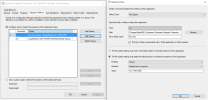
1649777836452.png
1649777518544.png If I push a re-install of the client, it the detects it as "Already Compliant".

Now that's weird... it detects it's not installed, then installs, then it can't detect it after the installation, re-install the client and it detects it's installed?

So I don't think it's the detection method, but possibly a corrupted client since the SCCM crash and redirection of the distribution point.

I guess we could push a global Client re-install and see it that resolves the detection issue.

Any idea or suggestion...?

The Appenforce.log
Performing detection of app deployment type Symantec Endpoint Protection 14.3.7393.4000 - Any Win - x64(ScopeId_1581B374-E276-44D2-9CBD-920E86D6D1D5/DeploymentType_f1aedb12-2b55-4087-b89f-f0fd494e7a15, revision 2) for system. AppEnforce 4/9/2022 7:01:25 PM 3280 (0x0CD0)
+++ Application not discovered. [AppDT Id: ScopeId_1581B374-E276-44D2-9CBD-920E86D6D1D5/DeploymentType_f1aedb12-2b55-4087-b89f-f0fd494e7a15, Revision: 2] AppEnforce 4/9/2022 7:01:25 PM 3280 (0x0CD0)
++++++ App enforcement completed (80 seconds) for App DT "Symantec Endpoint Protection 14.3.7393.4000 - Any Win - x64" [ScopeId_1581B374-E276-44D2-9CBD-920E86D6D1D5/DeploymentType_f1aedb12-2b55-4087-b89f-f0fd494e7a15], Revision: 2, User SID: ] ++++++ AppEnforce 4/9/2022 7:01:25 PM 3280 (0x0CD0)
+++ Starting Install enforcement for App DT "Symantec Endpoint Protection 14.3.7393.4000 - Any Win - x64" ApplicationDeliveryType - ScopeId_1581B374-E276-44D2-9CBD-920E86D6D1D5/DeploymentType_f1aedb12-2b55-4087-b89f-f0fd494e7a15, Revision - 2, ContentPath - C:\WINDOWS\ccmcache\1t, Execution Context - System AppEnforce 4/10/2022 7:04:54 PM 11016 (0x2B08)
Performing detection of app deployment type Symantec Endpoint Protection 14.3.7393.4000 - Any Win - x64(ScopeId_1581B374-E276-44D2-9CBD-920E86D6D1D5/DeploymentType_f1aedb12-2b55-4087-b89f-f0fd494e7a15, revision 2) for system. AppEnforce 4/10/2022 7:04:54 PM 11016 (0x2B08)
+++ Application not discovered. [AppDT Id: ScopeId_1581B374-E276-44D2-9CBD-920E86D6D1D5/DeploymentType_f1aedb12-2b55-4087-b89f-f0fd494e7a15, Revision: 2] AppEnforce 4/10/2022 7:04:54 PM 11016 (0x2B08)
App enforcement environment:
Context: Machine
Command line: "setup.exe"
Allow user interaction: No
UI mode: 1
User token: null
Session Id: 4294967295
Content path: C:\WINDOWS\ccmcache\1t
Working directory: AppEnforce 4/10/2022 7:04:54 PM 11016 (0x2B08)
Prepared working directory: C:\WINDOWS\ccmcache\1t AppEnforce 4/10/2022 7:04:54 PM 11016 (0x2B08)
Prepared command line: "C:\WINDOWS\ccmcache\1t\setup.exe" AppEnforce 4/10/2022 7:04:54 PM 11016 (0x2B08)
Executing Command line: "C:\WINDOWS\ccmcache\1t\setup.exe" with system context AppEnforce 4/10/2022 7:04:54 PM 11016 (0x2B08)
Working directory C:\WINDOWS\ccmcache\1t AppEnforce 4/10/2022 7:04:54 PM 11016 (0x2B08)
Post install behavior is BasedOnExitCode AppEnforce 4/10/2022 7:04:54 PM 11016 (0x2B08)
Waiting for process 9640 to finish. Timeout = 45 minutes. AppEnforce 4/10/2022 7:04:54 PM 11016 (0x2B08)
Process 9640 terminated with exitcode: 0 AppEnforce 4/10/2022 7:05:10 PM 11016 (0x2B08)
Looking for exit code 0 in exit codes table... AppEnforce 4/10/2022 7:05:10 PM 11016 (0x2B08)
Matched exit code 0 to a Success entry in exit codes table. AppEnforce 4/10/2022 7:05:10 PM 11016 (0x2B08)
Performing detection of app deployment type Symantec Endpoint Protection 14.3.7393.4000 - Any Win - x64(ScopeId_1581B374-E276-44D2-9CBD-920E86D6D1D5/DeploymentType_f1aedb12-2b55-4087-b89f-f0fd494e7a15, revision 2) for system. AppEnforce 4/10/2022 7:05:10 PM 11016 (0x2B08)
+++ Application not discovered. [AppDT Id: ScopeId_1581B374-E276-44D2-9CBD-920E86D6D1D5/DeploymentType_f1aedb12-2b55-4087-b89f-f0fd494e7a15, Revision: 2] AppEnforce 4/10/2022 7:05:10 PM 11016 (0x2B08)
++++++ App enforcement completed (15 seconds) for App DT "Symantec Endpoint Protection 14.3.7393.4000 - Any Win - x64" [ScopeId_1581B374-E276-44D2-9CBD-920E86D6D1D5/DeploymentType_f1aedb12-2b55-4087-b89f-f0fd494e7a15], Revision: 2, User SID: ] ++++++ AppEnforce 4/10/2022 7:05:10 PM 11016 (0x2B08)
 

Attachments

  • 1649777292299.png
    1649777292299.png
    219.2 KB · Views: 38
Solution
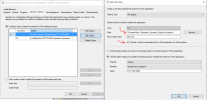
Just made a few tweaks on the Detection methods... removed the (x86) from the path and left the check mark on for redirection of a 32 bit application...

1649782447012.png

And on the registry detection, removed the WOW6432Node from the registry path, left 32 bit redirection on, and changed Data Type: from string to version.

Updated content... That seems to be helping... I'm getting better detection results now...
 
Another update... the above step did not resolve the detection issue either... what I discovered was after the program installed, and received Exit Code 0, meaning installation successful, when re-evaluation was tried, it could not detect the new version because the old version was still resident in the detection locations, both in programs and registry, because the reboot was pending to make the changes... so I changed the installation Exit Code to require a Hard Reboot, and now it is functioning correctly... after installation a reboot is required, then re-evaluation is successful, and reports status correctly.
 
Any update on this question please. I'm also facing same error with windows 10 feature update 20H2 but not found solution yet.
Hi Babu, I was experiencing the same issue... if you read my inputs you will find what I discovered in my situation. For some reason detection was working for half my machines, and the other half were reporting "Not Detected", What I was seeing is on the machines the old version was still resident after installation, and only a reboot cleared that... I changed the Exit Code to require a hard reboot first before exit app evaluation... not it is working correctly for all endpoints.
 
Status
Not open for further replies.

Forum statistics

Threads
7,162
Messages
27,953
Members
18,247
Latest member
amal

Latest posts

Trending content

Back
Top