Hello Prajwal,
Seeking your assistance.
I was having a WSUS Synchronization issue on my SCCM Server. So after going through your articles I have decided to uninstall and reinstall WSUS completely.
Our SCCM environment - We are running everything on the same server. SQL,WSUS and SCCM
Recent Changes - We have recently done an in-place upgrade of both SQL and Windows Server from 2016 to 2022 and the sync issue started.
So currently we are using Windows Server 2022 and the SQL 2022 and CCM 2409 installed on the same server.
All permissions are in place and I'm using a Domain account to perform everything.
What have I done so far?
-Took backup Snapshot of Server and DB
-Tried Uninstalling WSUS via Server Manager + Powershell (cmd: Uninstall-WindowsFeature UpdateServices,UpdateServices-Services,UpdateServices-DB -IncludeManagementTools)
-Cleared manually and ensured the folders and registry are gone -
1. C:\Program Files\Update Services\
2. D:\WSUS\ - Content Directory
3. Registry - HKLM\SOFTWARE\Microsoft\Update Services\
4. Removed wsuspool and WSUS administration Site from IIS
5. Dropped SUSDB from SQL -
USE master;
DROP DATABASE SUSDB;
Execute
- Rebooted the Server
- Did DISM check - DISM /Online /Cleanup-Image /RestoreHealth
- Started installation again
1.Powershell Install-WindowsFeature UpdateServices-Services,UpdateServices-DB -IncludeManagementTools
2.Installed successfully but the Tools folder was missing under C:\Program Files\Update Services\
3.Ran sfc /scannow and Tools folder appeared
4.Now when I'm running the Post Installation it keeps failing.
Command: "C:\Program Files\Update Services\Tools\wsusutil.exe" postinstall SQL_INSTANCE_NAME="Instance Name" CONTENT_DIR="D:\WSUS"
Error: Fatal Error: A network-related or instance-specific error occurred while establishing a connection to SQL Server. The server was not found or was not accessible. Verify that the instance name is correct and that SQL server is configured to allow remote connections. (provider: SQL Network interfaces, error:26 Server/Instance Specified)
-Since we have everything on the same server tried Instance Names - localhost, sccm server name, SQLDBName but failed with above error.
-It has created content Dir, SUSDB etc but failing the connection. Verified Settings on SSMS - Remote is enabled, Services are running, Account has sysadmin permissions etc.
- Tried doing the manual installation as well but no luck
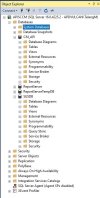
I have attached both Log files powershell + manual and DB Picture for your reference
It is so frustrating. Am I missing anything here?
Would appreciate your quick response.
Kind Regards,
Seeking your assistance.
I was having a WSUS Synchronization issue on my SCCM Server. So after going through your articles I have decided to uninstall and reinstall WSUS completely.
Our SCCM environment - We are running everything on the same server. SQL,WSUS and SCCM
Recent Changes - We have recently done an in-place upgrade of both SQL and Windows Server from 2016 to 2022 and the sync issue started.
So currently we are using Windows Server 2022 and the SQL 2022 and CCM 2409 installed on the same server.
All permissions are in place and I'm using a Domain account to perform everything.
What have I done so far?
-Took backup Snapshot of Server and DB
-Tried Uninstalling WSUS via Server Manager + Powershell (cmd: Uninstall-WindowsFeature UpdateServices,UpdateServices-Services,UpdateServices-DB -IncludeManagementTools)
-Cleared manually and ensured the folders and registry are gone -
1. C:\Program Files\Update Services\
2. D:\WSUS\ - Content Directory
3. Registry - HKLM\SOFTWARE\Microsoft\Update Services\
4. Removed wsuspool and WSUS administration Site from IIS
5. Dropped SUSDB from SQL -
USE master;
DROP DATABASE SUSDB;
Execute
- Rebooted the Server
- Did DISM check - DISM /Online /Cleanup-Image /RestoreHealth
- Started installation again
1.Powershell Install-WindowsFeature UpdateServices-Services,UpdateServices-DB -IncludeManagementTools
2.Installed successfully but the Tools folder was missing under C:\Program Files\Update Services\
3.Ran sfc /scannow and Tools folder appeared
4.Now when I'm running the Post Installation it keeps failing.
Command: "C:\Program Files\Update Services\Tools\wsusutil.exe" postinstall SQL_INSTANCE_NAME="Instance Name" CONTENT_DIR="D:\WSUS"
Error: Fatal Error: A network-related or instance-specific error occurred while establishing a connection to SQL Server. The server was not found or was not accessible. Verify that the instance name is correct and that SQL server is configured to allow remote connections. (provider: SQL Network interfaces, error:26 Server/Instance Specified)
-Since we have everything on the same server tried Instance Names - localhost, sccm server name, SQLDBName but failed with above error.
-It has created content Dir, SUSDB etc but failing the connection. Verified Settings on SSMS - Remote is enabled, Services are running, Account has sysadmin permissions etc.
- Tried doing the manual installation as well but no luck
I have attached both Log files powershell + manual and DB Picture for your reference
It is so frustrating. Am I missing anything here?
Would appreciate your quick response.
Kind Regards,