
joe.riling
New Member
- Messages
- 4
- Solutions
- 1
- Reaction score
- 0
- Points
- 1
Hello,
This site has been wonderful in helping me through my Endpoint Manager journey thus far, but I need to reach out for help. I have been having an error with my management point after upgrading 2 versions ago. I am currently on v2207 and installed Hotfix Rollup (KB15152495).
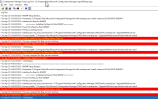
The initial issue was clients being discovered in Endpoint Manager with only a ? in the device icon. After reviewing all the logs on the primary site server I determined that the management point is in an unhealthy state. Currently I am getting the following errors in the logs. "Failed to Install Pre Req CcmSetup. Return Code is 6". So, since the management point is unhealthy that tells me that the clients are having an issue communicating back. Let me know if I'm thinking about this the wrong way.
Things I have tried so far:
1) Disabling antivirus
2) Upgrading the client on the site server.
3) Rebooting the server
4) Ensuring that the Management point role is using the Site System Server as the connection.
5) Ensuring that the site server is a member of the local Administrator group
6) Confirmed that I can access the IIS management point site
7) IIS logs show return code 200
Things I have not tried as I am unsure if I should try:
1) Removing and reinstalling the Management point role
2) Cleaning up WMI
Any help would be greatly appreciated. I have attached a snip of the MPSetup.log.
This site has been wonderful in helping me through my Endpoint Manager journey thus far, but I need to reach out for help. I have been having an error with my management point after upgrading 2 versions ago. I am currently on v2207 and installed Hotfix Rollup (KB15152495).
The initial issue was clients being discovered in Endpoint Manager with only a ? in the device icon. After reviewing all the logs on the primary site server I determined that the management point is in an unhealthy state. Currently I am getting the following errors in the logs. "Failed to Install Pre Req CcmSetup. Return Code is 6". So, since the management point is unhealthy that tells me that the clients are having an issue communicating back. Let me know if I'm thinking about this the wrong way.
Things I have tried so far:
1) Disabling antivirus
2) Upgrading the client on the site server.
3) Rebooting the server
4) Ensuring that the Management point role is using the Site System Server as the connection.
6) Confirmed that I can access the IIS management point site
7) IIS logs show return code 200
Things I have not tried as I am unsure if I should try:
1) Removing and reinstalling the Management point role
2) Cleaning up WMI
Any help would be greatly appreciated. I have attached a snip of the MPSetup.log.
Last edited:


