Forums on Intune, SCCM, and Windows 11

Welcome to the forums. Register a free account today to become a member! Once signed in, you'll be able to participate on this site by adding your topics and posts, as well as connect with other members through your own private inbox!

SOLVED Error reading location override information from WMI. Return code: 0x80041010

  • Thread starter Thread starter shoaib689
  • Start date Start date
  • Replies Replies 14
  • Views Views 7K
Status
Not open for further replies.

shoaib689

Well-Known Member
Messages
53
Reaction score
0
Points
6
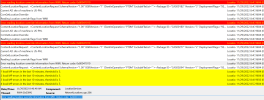
Getting this error on multiple machines i will try to fix one please help Prajwal Sir
Error reading location override information from WMI. Return code: 0x80041010
 

Attachments

  • WMI error.PNG
    WMI error.PNG
    94.2 KB · Views: 20
Solution
You get this issue when attempting to update the CM client? . If yes, please upgrade the Management Point before attempting to upgrade the client.

Include more information, such as the time the error first appeared.
You get this issue when attempting to update the CM client? . If yes, please upgrade the Management Point before attempting to upgrade the client.

Include more information, such as the time the error first appeared.
 
Solution
Thank you so much for your reply I am going to upgrade MECM, let me know after upgradation problem would be solved?
 
You get this issue when attempting to update the CM client? . If yes, please upgrade the Management Point before attempting to upgrade the client.

Include more information, such as the time the error first appeared.

Yesterday i have upgraded MECM console on 2207 and MP also upgraded on version 5.99.9088.1007, pending client upgradation, Client upgradation is going let you know once done.
 
Some machines are showing under compliant but they are non-compliant, in content status machines are under green status. Why is it so?
 
Upgraded MP to latest version and some client still under older version but the machines are showing under compliant why is it so?
 
Open software centre on one of the impacted devices, navigate to the device compliance tab (Enable if it is not already enabled for a single machine), and click check complaint.
 
I have upgraded OS build version to 20h2 to 22h2 and deploy WSUS-client reset script at client end now its working fine please close this thread, Thanks Prajwal SIr and Muneer.
 
Status
Not open for further replies.

Forum statistics

Threads
7,151
Messages
27,920
Members
18,222
Latest member
eperkun

Trending content

Back
Top