
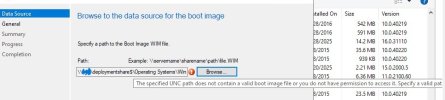
Greetings, I have run into the error message above and followed the only advice that I can find to use the "Browse" button in the add boot image wizard. I am currently on SCCM Version 2503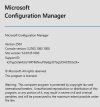
ADK version 10.1.26100.2454 .

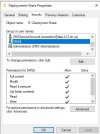
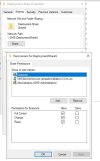
I am building a Windows 11 image (24H2) and updating my domain computers. I am stuck adding a boot image. I double checked my file permissions and ntfs permissions and they seem to be open correctly.
Any help would be appreciated.
Oh just for fun, I tried to use the "create a boot Image with mdt and it crashed the console..
As an update, I found another thread that states that maybe the error is not directly in the SCCM. So I reran the ADK setup to fix the Mounting link in registry. Then i verified that I can infact mount the Image file with DISM. Still stuck with the same error on importing the boot.wim
ADK version 10.1.26100.2454 .
I am building a Windows 11 image (24H2) and updating my domain computers. I am stuck adding a boot image. I double checked my file permissions and ntfs permissions and they seem to be open correctly.
Any help would be appreciated.
Oh just for fun, I tried to use the "create a boot Image with mdt and it crashed the console..
As an update, I found another thread that states that maybe the error is not directly in the SCCM. So I reran the ADK setup to fix the Mounting link in registry. Then i verified that I can infact mount the Image file with DISM. Still stuck with the same error on importing the boot.wim
Last edited:


