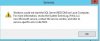
I have checked the System Center Data Access service and it is running but still I am having issue.
there is one more service which is not running, and I tried that but keep giving me an error.
Services.msc ERROR
Windows could not start the SQL Server(RESCOM) on local computer.
For More information, Review the system Event Log. if this is a non-Microsoft Service, Contact the service Vendor, and refer to Service-specific Error Code 5023:
Event Viewer
file attached.
SCOM ERROR
Date: 2/25/2020 3:29:57 PM
Application: Operations Manager
Application Version: 7.0.9538.1136
Severity: Error
Message: Failed to connect to server 'XXXX'
Microsoft.EnterpriseManagement.Common.ServiceNotRunningException: The Data Access service is either not running or not yet initialized. Check the event log for more information. ---> System.ServiceModel.EndpointNotFoundException: Could not connect to net.tcp://xxxxxxxxxxxxx:5724/DispatcherService. The connection attempt lasted for a time span of 00:00:02.0039533. TCP error code 10061: No connection could be made because the target machine actively refused it XX.XX.XX.XX:5724. ---> System.Net.Sockets.SocketException: No connection could be made because the target machine actively refused it 10.30.26.65:5724
at System.Net.Sockets.Socket.DoConnect(EndPoint endPointSnapshot, SocketAddress socketAddress)
at System.Net.Sockets.Socket.Connect(EndPoint remoteEP)
at System.ServiceModel.Channels.SocketConnectionInitiator.Connect(Uri uri, TimeSpan timeout)
--- End of inner exception stack trace ---
Server stack trace:
at System.ServiceModel.Channels.SocketConnectionInitiator.Connect(Uri uri, TimeSpan timeout)
at System.ServiceModel.Channels.BufferedConnectionInitiator.Connect(Uri uri, TimeSpan timeout)
at System.ServiceModel.Channels.ConnectionPoolHelper.EstablishConnection(TimeSpan timeout)
at System.ServiceModel.Channels.ClientFramingDuplexSessionChannel.OnOpen(TimeSpan timeout)
at System.ServiceModel.Channels.CommunicationObject.Open(TimeSpan timeout)
at System.ServiceModel.Channels.LayeredChannel`1.OnOpen(TimeSpan timeout)
at System.ServiceModel.Channels.CommunicationObject.Open(TimeSpan timeout)
at System.ServiceModel.Channels.ServiceChannel.OnOpen(TimeSpan timeout)
at System.ServiceModel.Channels.CommunicationObject.Open(TimeSpan timeout)
at System.ServiceModel.Channels.ServiceChannel.CallOpenOnce.System.ServiceModel.Channels.ServiceChannel.ICallOnce.Call(ServiceChannel channel, TimeSpan timeout)
at System.ServiceModel.Channels.ServiceChannel.CallOnceManager.CallOnce(TimeSpan timeout, CallOnceManager cascade)
at System.ServiceModel.Channels.ServiceChannel.EnsureOpened(TimeSpan timeout)
at System.ServiceModel.Channels.ServiceChannel.Call(String action, Boolean oneway, ProxyOperationRuntime operation, Object[] ins, Object[] outs, TimeSpan timeout)
at System.ServiceModel.Channels.ServiceChannelProxy.InvokeService(IMethodCallMessage methodCall, ProxyOperationRuntime operation)
at System.ServiceModel.Channels.ServiceChannelProxy.Invoke(IMessage message)
Exception rethrown at [0]:
at System.Runtime.Remoting.Proxies.RealProxy.HandleReturnMessage(IMessage reqMsg, IMessage retMsg)
at System.Runtime.Remoting.Proxies.RealProxy.PrivateInvoke(MessageData& msgData, Int32 type)
at Microsoft.EnterpriseManagement.Common.Internal.IDispatcherService.Connect(SdkClientConnectionOptions connectionOptions)
at Microsoft.EnterpriseManagement.Common.Internal.SdkDataLayerProxyCore.Initialize(EnterpriseManagementConnectionSettings connectionSettings, SdkChannelObject`1 channelObjectDispatcherService)
at Microsoft.EnterpriseManagement.Common.Internal.SdkDataLayerProxyCore.CreateEndpoint[T](EnterpriseManagementConnectionSettings connectionSettings, SdkChannelObject`1 channelObjectDispatcherService)
--- End of inner exception stack trace ---
at Microsoft.EnterpriseManagement.Common.Internal.ExceptionHandlers.HandleChannelExceptions(Exception ex)
at Microsoft.EnterpriseManagement.Common.Internal.SdkDataLayerProxyCore.CreateEndpoint[T](EnterpriseManagementConnectionSettings connectionSettings, SdkChannelObject`1 channelObjectDispatcherService)
at Microsoft.EnterpriseManagement.Common.Internal.SdkDataLayerProxyCore.ConstructEnterpriseManagementGroupInternal[T,P](EnterpriseManagementConnectionSettings connectionSettings, ClientDataAccessCore clientCallback)
at Microsoft.EnterpriseManagement.Common.Internal.SdkDataLayerProxyCore.RetrieveEnterpriseManagementGroupInternal[T,P](EnterpriseManagementConnectionSettings connectionSettings, ClientDataAccessCore callbackDispatcherService)
at Microsoft.EnterpriseManagement.Common.Internal.SdkDataLayerProxyCore.Connect[T,P](EnterpriseManagementConnectionSettings connectionSettings, ClientDataAccessCore callbackDispatcherService)
at Microsoft.EnterpriseManagement.ManagementGroup.InternalInitialize(EnterpriseManagementConnectionSettings connectionSettings, ManagementGroupInternal internals)
at Microsoft.EnterpriseManagement.Mom.Internal.UI.Common.ManagementGroupSessionManager.Connect(String server)
at Microsoft.EnterpriseManagement.Monitoring.Console.Internal.ConsoleWindowBase.TryConnectToManagementGroupJob(Object sender, ConsoleJobEventArgs args)
System.ServiceModel.EndpointNotFoundException: Could not connect to net.tcp://xxxxxxxxx:5724/DispatcherService. The connection attempt lasted for a time span of 00:00:02.0039533. TCP error code 10061: No connection could be made because the target machine actively refused it xx.xx.xx.xx:5724. ---> System.Net.Sockets.SocketException: No connection could be made because the target machine actively refused it 10.30.26.65:5724
at System.Net.Sockets.Socket.DoConnect(EndPoint endPointSnapshot, SocketAddress socketAddress)
at System.Net.Sockets.Socket.Connect(EndPoint remoteEP)
at System.ServiceModel.Channels.SocketConnectionInitiator.Connect(Uri uri, TimeSpan timeout)
--- End of inner exception stack trace ---
Server stack trace:
at System.ServiceModel.Channels.SocketConnectionInitiator.Connect(Uri uri, TimeSpan timeout)
at System.ServiceModel.Channels.BufferedConnectionInitiator.Connect(Uri uri, TimeSpan timeout)
at System.ServiceModel.Channels.ConnectionPoolHelper.EstablishConnection(TimeSpan timeout)
at System.ServiceModel.Channels.ClientFramingDuplexSessionChannel.OnOpen(TimeSpan timeout)
at System.ServiceModel.Channels.CommunicationObject.Open(TimeSpan timeout)
at System.ServiceModel.Channels.LayeredChannel`1.OnOpen(TimeSpan timeout)
at System.ServiceModel.Channels.CommunicationObject.Open(TimeSpan timeout)
at System.ServiceModel.Channels.ServiceChannel.OnOpen(TimeSpan timeout)
at System.ServiceModel.Channels.CommunicationObject.Open(TimeSpan timeout)
at System.ServiceModel.Channels.ServiceChannel.CallOpenOnce.System.ServiceModel.Channels.ServiceChannel.ICallOnce.Call(ServiceChannel channel, TimeSpan timeout)
at System.ServiceModel.Channels.ServiceChannel.CallOnceManager.CallOnce(TimeSpan timeout, CallOnceManager cascade)
at System.ServiceModel.Channels.ServiceChannel.EnsureOpened(TimeSpan timeout)
at System.ServiceModel.Channels.ServiceChannel.Call(String action, Boolean oneway, ProxyOperationRuntime operation, Object[] ins, Object[] outs, TimeSpan timeout)
at System.ServiceModel.Channels.ServiceChannelProxy.InvokeService(IMethodCallMessage methodCall, ProxyOperationRuntime operation)
at System.ServiceModel.Channels.ServiceChannelProxy.Invoke(IMessage message)
Exception rethrown at [0]:
at System.Runtime.Remoting.Proxies.RealProxy.HandleReturnMessage(IMessage reqMsg, IMessage retMsg)
at System.Runtime.Remoting.Proxies.RealProxy.PrivateInvoke(MessageData& msgData, Int32 type)
at Microsoft.EnterpriseManagement.Common.Internal.IDispatcherService.Connect(SdkClientConnectionOptions connectionOptions)
at Microsoft.EnterpriseManagement.Common.Internal.SdkDataLayerProxyCore.Initialize(EnterpriseManagementConnectionSettings connectionSettings, SdkChannelObject`1 channelObjectDispatcherService)
at Microsoft.EnterpriseManagement.Common.Internal.SdkDataLayerProxyCore.CreateEndpoint[T](EnterpriseManagementConnectionSettings connectionSettings, SdkChannelObject`1 channelObjectDispatcherService)
System.Net.Sockets.SocketException (0x80004005): No connection could be made because the target machine actively refused it 10.30.26.65:5724
at System.Net.Sockets.Socket.DoConnect(EndPoint endPointSnapshot, SocketAddress socketAddress)
at System.Net.Sockets.Socket.Connect(EndPoint remoteEP)
at System.ServiceModel.Channels.SocketConnectionInitiator.Connect(Uri uri, TimeSpan timeout)
there is one more service which is not running, and I tried that but keep giving me an error.
Services.msc ERROR
Windows could not start the SQL Server(RESCOM) on local computer.
For More information, Review the system Event Log. if this is a non-Microsoft Service, Contact the service Vendor, and refer to Service-specific Error Code 5023:
Event Viewer
file attached.
SCOM ERROR
Date: 2/25/2020 3:29:57 PM
Application: Operations Manager
Application Version: 7.0.9538.1136
Severity: Error
Message: Failed to connect to server 'XXXX'
Microsoft.EnterpriseManagement.Common.ServiceNotRunningException: The Data Access service is either not running or not yet initialized. Check the event log for more information. ---> System.ServiceModel.EndpointNotFoundException: Could not connect to net.tcp://xxxxxxxxxxxxx:5724/DispatcherService. The connection attempt lasted for a time span of 00:00:02.0039533. TCP error code 10061: No connection could be made because the target machine actively refused it XX.XX.XX.XX:5724. ---> System.Net.Sockets.SocketException: No connection could be made because the target machine actively refused it 10.30.26.65:5724
at System.Net.Sockets.Socket.DoConnect(EndPoint endPointSnapshot, SocketAddress socketAddress)
at System.Net.Sockets.Socket.Connect(EndPoint remoteEP)
at System.ServiceModel.Channels.SocketConnectionInitiator.Connect(Uri uri, TimeSpan timeout)
--- End of inner exception stack trace ---
Server stack trace:
at System.ServiceModel.Channels.SocketConnectionInitiator.Connect(Uri uri, TimeSpan timeout)
at System.ServiceModel.Channels.BufferedConnectionInitiator.Connect(Uri uri, TimeSpan timeout)
at System.ServiceModel.Channels.ConnectionPoolHelper.EstablishConnection(TimeSpan timeout)
at System.ServiceModel.Channels.ClientFramingDuplexSessionChannel.OnOpen(TimeSpan timeout)
at System.ServiceModel.Channels.CommunicationObject.Open(TimeSpan timeout)
at System.ServiceModel.Channels.LayeredChannel`1.OnOpen(TimeSpan timeout)
at System.ServiceModel.Channels.CommunicationObject.Open(TimeSpan timeout)
at System.ServiceModel.Channels.ServiceChannel.OnOpen(TimeSpan timeout)
at System.ServiceModel.Channels.CommunicationObject.Open(TimeSpan timeout)
at System.ServiceModel.Channels.ServiceChannel.CallOpenOnce.System.ServiceModel.Channels.ServiceChannel.ICallOnce.Call(ServiceChannel channel, TimeSpan timeout)
at System.ServiceModel.Channels.ServiceChannel.CallOnceManager.CallOnce(TimeSpan timeout, CallOnceManager cascade)
at System.ServiceModel.Channels.ServiceChannel.EnsureOpened(TimeSpan timeout)
at System.ServiceModel.Channels.ServiceChannel.Call(String action, Boolean oneway, ProxyOperationRuntime operation, Object[] ins, Object[] outs, TimeSpan timeout)
at System.ServiceModel.Channels.ServiceChannelProxy.InvokeService(IMethodCallMessage methodCall, ProxyOperationRuntime operation)
at System.ServiceModel.Channels.ServiceChannelProxy.Invoke(IMessage message)
Exception rethrown at [0]:
at System.Runtime.Remoting.Proxies.RealProxy.HandleReturnMessage(IMessage reqMsg, IMessage retMsg)
at System.Runtime.Remoting.Proxies.RealProxy.PrivateInvoke(MessageData& msgData, Int32 type)
at Microsoft.EnterpriseManagement.Common.Internal.IDispatcherService.Connect(SdkClientConnectionOptions connectionOptions)
at Microsoft.EnterpriseManagement.Common.Internal.SdkDataLayerProxyCore.Initialize(EnterpriseManagementConnectionSettings connectionSettings, SdkChannelObject`1 channelObjectDispatcherService)
at Microsoft.EnterpriseManagement.Common.Internal.SdkDataLayerProxyCore.CreateEndpoint[T](EnterpriseManagementConnectionSettings connectionSettings, SdkChannelObject`1 channelObjectDispatcherService)
--- End of inner exception stack trace ---
at Microsoft.EnterpriseManagement.Common.Internal.ExceptionHandlers.HandleChannelExceptions(Exception ex)
at Microsoft.EnterpriseManagement.Common.Internal.SdkDataLayerProxyCore.CreateEndpoint[T](EnterpriseManagementConnectionSettings connectionSettings, SdkChannelObject`1 channelObjectDispatcherService)
at Microsoft.EnterpriseManagement.Common.Internal.SdkDataLayerProxyCore.ConstructEnterpriseManagementGroupInternal[T,P](EnterpriseManagementConnectionSettings connectionSettings, ClientDataAccessCore clientCallback)
at Microsoft.EnterpriseManagement.Common.Internal.SdkDataLayerProxyCore.RetrieveEnterpriseManagementGroupInternal[T,P](EnterpriseManagementConnectionSettings connectionSettings, ClientDataAccessCore callbackDispatcherService)
at Microsoft.EnterpriseManagement.Common.Internal.SdkDataLayerProxyCore.Connect[T,P](EnterpriseManagementConnectionSettings connectionSettings, ClientDataAccessCore callbackDispatcherService)
at Microsoft.EnterpriseManagement.ManagementGroup.InternalInitialize(EnterpriseManagementConnectionSettings connectionSettings, ManagementGroupInternal internals)
at Microsoft.EnterpriseManagement.Mom.Internal.UI.Common.ManagementGroupSessionManager.Connect(String server)
at Microsoft.EnterpriseManagement.Monitoring.Console.Internal.ConsoleWindowBase.TryConnectToManagementGroupJob(Object sender, ConsoleJobEventArgs args)
System.ServiceModel.EndpointNotFoundException: Could not connect to net.tcp://xxxxxxxxx:5724/DispatcherService. The connection attempt lasted for a time span of 00:00:02.0039533. TCP error code 10061: No connection could be made because the target machine actively refused it xx.xx.xx.xx:5724. ---> System.Net.Sockets.SocketException: No connection could be made because the target machine actively refused it 10.30.26.65:5724
at System.Net.Sockets.Socket.DoConnect(EndPoint endPointSnapshot, SocketAddress socketAddress)
at System.Net.Sockets.Socket.Connect(EndPoint remoteEP)
at System.ServiceModel.Channels.SocketConnectionInitiator.Connect(Uri uri, TimeSpan timeout)
--- End of inner exception stack trace ---
Server stack trace:
at System.ServiceModel.Channels.SocketConnectionInitiator.Connect(Uri uri, TimeSpan timeout)
at System.ServiceModel.Channels.BufferedConnectionInitiator.Connect(Uri uri, TimeSpan timeout)
at System.ServiceModel.Channels.ConnectionPoolHelper.EstablishConnection(TimeSpan timeout)
at System.ServiceModel.Channels.ClientFramingDuplexSessionChannel.OnOpen(TimeSpan timeout)
at System.ServiceModel.Channels.CommunicationObject.Open(TimeSpan timeout)
at System.ServiceModel.Channels.LayeredChannel`1.OnOpen(TimeSpan timeout)
at System.ServiceModel.Channels.CommunicationObject.Open(TimeSpan timeout)
at System.ServiceModel.Channels.ServiceChannel.OnOpen(TimeSpan timeout)
at System.ServiceModel.Channels.CommunicationObject.Open(TimeSpan timeout)
at System.ServiceModel.Channels.ServiceChannel.CallOpenOnce.System.ServiceModel.Channels.ServiceChannel.ICallOnce.Call(ServiceChannel channel, TimeSpan timeout)
at System.ServiceModel.Channels.ServiceChannel.CallOnceManager.CallOnce(TimeSpan timeout, CallOnceManager cascade)
at System.ServiceModel.Channels.ServiceChannel.EnsureOpened(TimeSpan timeout)
at System.ServiceModel.Channels.ServiceChannel.Call(String action, Boolean oneway, ProxyOperationRuntime operation, Object[] ins, Object[] outs, TimeSpan timeout)
at System.ServiceModel.Channels.ServiceChannelProxy.InvokeService(IMethodCallMessage methodCall, ProxyOperationRuntime operation)
at System.ServiceModel.Channels.ServiceChannelProxy.Invoke(IMessage message)
Exception rethrown at [0]:
at System.Runtime.Remoting.Proxies.RealProxy.HandleReturnMessage(IMessage reqMsg, IMessage retMsg)
at System.Runtime.Remoting.Proxies.RealProxy.PrivateInvoke(MessageData& msgData, Int32 type)
at Microsoft.EnterpriseManagement.Common.Internal.IDispatcherService.Connect(SdkClientConnectionOptions connectionOptions)
at Microsoft.EnterpriseManagement.Common.Internal.SdkDataLayerProxyCore.Initialize(EnterpriseManagementConnectionSettings connectionSettings, SdkChannelObject`1 channelObjectDispatcherService)
at Microsoft.EnterpriseManagement.Common.Internal.SdkDataLayerProxyCore.CreateEndpoint[T](EnterpriseManagementConnectionSettings connectionSettings, SdkChannelObject`1 channelObjectDispatcherService)
System.Net.Sockets.SocketException (0x80004005): No connection could be made because the target machine actively refused it 10.30.26.65:5724
at System.Net.Sockets.Socket.DoConnect(EndPoint endPointSnapshot, SocketAddress socketAddress)
at System.Net.Sockets.Socket.Connect(EndPoint remoteEP)
at System.ServiceModel.Channels.SocketConnectionInitiator.Connect(Uri uri, TimeSpan timeout)