Forums on Intune, SCCM, and Windows 11

Welcome to the forums. Register a free account today to become a member! Once signed in, you'll be able to participate on this site by adding your topics and posts, as well as connect with other members through your own private inbox!

PENDING Cumulative Update for Windows 11 Version 22H2 Fails to download

  • Thread starter Thread starter Ase
  • Start date Start date
  • Replies Replies 19
  • Views Views 15K

Ase

Member
Messages
11
Solutions
1
Reaction score
0
Points
1
Hi,
Using latest SCCM (2303).
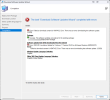
The last months the following updates failes to download to the server for deployment:
2023-04 Cumulative Update for Windows 11 Version 22H2 for x64-based Systems (KB5025239)
2023-05 Cumulative Update for Windows 11 Version 22H2 for x64-based Systems (KB5026372)
All other downloads work fine.

Ideas?
Thanks,
Ase
 
Hi,
Using latest SCCM (2303).
The last months the following updates failes to download to the server for deployment:
2023-04 Cumulative Update for Windows 11 Version 22H2 for x64-based Systems (KB5025239)
2023-05 Cumulative Update for Windows 11 Version 22H2 for x64-based Systems (KB5026372)
All other downloads work fine.

Ideas?
Thanks,
Ase
What do the logs say?
Did you try to download the SU outside of the console? https://www.recastsoftware.com/reso...-software-update-outside-of-the-sccm-console/
 
Thanks Garth for the reply!

The files does download if I manually try that from the WSUS/SCCM Server from the recast guide (did not try all 13, but 5 first was no problem).
What log file should I look in, here I need some guidance?

Thanks,
Ase
For clarity, you download the SU using the local system account and NOT your own account? e.g. To help remove proxies from the list of issue.
 
For clarity, you download the SU using the local system account and NOT your own account? e.g. To help remove proxies from the list of issue.
This is my LAB environment and using accounts with enough priviledges. Every update before and after works fine only these two have failed 2023-04 and now 2023-05 for Windows 11 22H2.
Same Cumulative Updates for Servers 21H2 x64, downloaded and installed just fine.
 
Last edited:
This is my LAB environment and using accounts with enough priviledges. Every update before and after works fine only these two have failed 2023-04 and now 2023-05 for Windows 11 22H2.
Same Cumulative Updates for Servers 21H2 x64, downloaded and installed just fine.
It is important that you download the SU using the local system account as this is the account ConfigMgr will use to download the SU. This will help eliminate proxy /firewall/ packet shaper issues, etc.
 
Can you please open up the issue some more. why would proxy /firewall/ packet shaper issues just stop these two updates so far and allow all other updates to work fine?
 
Can you please open up the issue some more. why would proxy /firewall/ packet shaper issues just stop these two updates so far and allow all other updates to work fine?
There are millions of reasons. If this fails outside of ConfigMgr then you can pass it along to your network team and make them fix it. You need to run the test as local system account and download the file.

if it doesn't fail using the local system account, then you need to open a support case with MS.
 
There are millions of reasons. If this fails outside of ConfigMgr then you can pass it along to your network team and make them fix it. You need to run the test as local system account and download the file.

if it doesn't fail using the local system account, then you need to open a support case with MS.
There are millions of reasons, does not help me.
Back to the same basic question, why do all other updates work but not these two, the rest of the updates working fine for a long time?
What logs should i check for more info?
Anyone else with the the same problem?
 
Last edited:
There are millions of reasons, does not help me.
Back to the same basic question, why do all other updates work but not these two, the rest of the updates working fine for a long time?
What logs should i check for more info?
Anyone else with the the same problem?
If you have download the SU using the local system account (and not your own account) and the download does NOT fail. You have no choose but to open a support case with MS as the problem is with ConfigMgr.
 
Hi,
Using latest SCCM (2303).
The last months the following updates failes to download to the server for deployment:
2023-04 Cumulative Update for Windows 11 Version 22H2 for x64-based Systems (KB5025239)
2023-05 Cumulative Update for Windows 11 Version 22H2 for x64-based Systems (KB5026372)
All other downloads work fine.

Ideas?
Thanks,
Ase
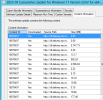
This is exactly the same issue I am facing and for last weeks I am pulling my hair. What I could understand so far is, if you see the content source of these updates in SCCM console it shows multiple sources with Deliver optimize sites. Microsoft has introduced Delivery optimization for its updates. And I am not sure why it is not working....
 
This is exactly the same issue I am facing and for last weeks I am pulling my hair. What I could understand so far is, if you see the content source of these updates in SCCM console it shows multiple sources with Deliver optimize sites. Microsoft has introduced Delivery optimization for its updates. And I am not sure why it is not working....
Did you test downloading the SU outside of SCCM, using the local system account? if you did your only option is to contact MS support direct and work with them.
 
I am having the same exact issue, just the cumulative security updates to Win11 22H2 - Started with April and also same for May 2023. No problems Win11 version previous to 22H2 or Win10.

Best I can see is that the file download links being passed to the clients from SCCM are incorrect - this is pointing to something in the WSUS definitions that SCCM is using being wrong. The clients download the files indicated in the patch but then throw a hash error.
 
Also wanted to mention file payload coming from WSUS is huge for these, over 8 GB but if I download the same KB from the Microsoft catalog they are only 300MB.

Screenshot 2023-05-19 105240.png
 
Also having the same issue. Anyone managed to solve it?
The size of the update seems to be that large because Feature On Demand Image is also downloaded on each client!!
 
I am having the same exact issue!
The following updates failes to download to the server for deployment:

2024-06 Cumulative Update for Windows 11 Version 22H2 for x64-based Systems (KB5039212)
2024-06 Cumulative Update for Windows 11 Version 23H2 for x64-based Systems (KB5039212)

Error: Access is denied or
Error: The process cannot access the file because it is being used by another process.

All other downloads work fine. Any more ideas for resolve?
What logs should i check for more info?
 
Last edited:
I am having this issue also with KB5039212. About 20 other KBs downloaded successfully, so this isn't a local / account / network / firewall / proxy issue.

I grabbed all 17 Content Location URLs for the KB and was able to download all of them successfully outside of MECM. Again, this is not a MECM issue.
 
I am having this issue also with KB5039212. About 20 other KBs downloaded successfully, so this isn't a local / account / network / firewall / proxy issue.

I grabbed all 17 Content Location URLs for the KB and was able to download all of them successfully outside of MECM. Again, this is not a MECM issue.
Greeting!
I can also download the content manually, but how can I import it into MECM and on to the clients?
 
I tried again this morning and got a new (different) error ...

Error: Failed to download content id 18736149. Error: Cannot create a file when that file already exists.
Package:
The software updates were placed in a new package:
• 2024-06_Win11
Success: Content (1):
• All Office & External
Distribution Settings
• Priority: Medium
• Enable for on-demand distribution: Disabled
• Prestaged distribution point settings: Manually copy the content in this package to the distribution point

Software updates that will be downloaded from the internet
Error: 2024-06 Cumulative Update for Windows 11 Version 23H2 for x64-based Systems (KB5039212)

I created a completely new Update Group and Deployment Package in a new folder. The error suggests it is trying to download the same content twice.

The attached contains snippets of PatchDownloader.log.

How exactly does one download 140% of something?

Based on the log, it appears it failed while downloading Windows11.0-KB5039212-x64.cab.

Any ideas?
 

Attachments

Forum statistics

Threads
7,133
Messages
27,858
Members
18,151
Latest member
TonyGTR
Back
Top